
Office worker health risks explained in short: the ones that matter most are musculoskeletal problems from posture and repetitive input, eye strain from long screen sessions, psychological strain from workload, cardiovascular and metabolic harm from sitting for hours, and exposure to poor air, noise, lighting and glare. Each of those is driven by the same three things — how long you are exposed, how intense the exposure is, and how the workplace is set up — which is why small structural fixes usually beat willpower.
Office work has the odd property of being low-hazard in the dramatic sense and still quite harmful in the cumulative sense. Nobody breaks a wrist at a desk, but almost everyone at a desk eventually notices something: a neck that stiffens by Friday, eyes that burn at 4pm, a shoulder that aches during a spreadsheet marathon, or a Sunday evening dread that has nothing to do with the weekend.
This guide walks through the health risks of office work category by category, what each one looks like, what reduces it, and where the line sits between a fixable workstation problem and a symptom worth taking to a clinician. It is written for employees, managers and anyone who has to make a case for a better chair or a ventilation check.
Table of Contents
- What Health Risks Do Office Workers Face?
- Office Worker Health Risks Explained by Source
- How Can Mental Health and Burnout Risks Affect Office Workers?
- Which Environmental Exposures Can Harm Office Workers?
- How Does Sedentary Office Work Affect Health?
- What Signs Should Prompt a Medical Consultation?
- How Can Employers and Workers Reduce Office Health Risks?
- What Evidence and Guidance Should Employers Use?
- Frequently Asked Questions
- Conclusion: Start With the Biggest Workplace Risk
What Health Risks Do Office Workers Face?
Office worker health risks fall into five broad groups: physical and ergonomic, visual, psychological, environmental, and organisational. They differ from every other occupational hazard in that they accumulate quietly. A single afternoon at a badly adjusted desk will not hurt you. Ten years of it will.
Risk in an office is a function of dose, intensity and setting. Dose is hours per day seated and screen-facing. Intensity covers repetition, force, posture, glare, noise and workload. Setting is the room itself — chair, monitor position, lighting, air movement, temperature. Reduce any one of the three and exposure falls; that is why rearranging a monitor often helps more than an app or a supplement.
The person matters too. Prior injury, pregnancy, age, eyesight, current health conditions and whether the workstation fits your body all change how the same desk affects two people differently.
| Risk category | Common sources | Warning signs | Prevention priority |
|---|---|---|---|
| Musculoskeletal | Prolonged sitting, awkward posture, repetitive typing and mouse work, poor monitor height, manual handling | Neck and shoulder aching, lower back pain, wrist tingling, hand numbness, morning stiffness | Workstation fit, task variation, frequent short breaks |
| Visual | Long screen sessions, glare, low-contrast displays, dry indoor air, poor screen brightness matching | Blurred vision, dry or burning eyes, headaches that build through the day, focusing difficulty | Screen and lighting setup, the 20-20-20 habit, blink and humidity |
| Psychological | High workload, low control over how work is done, role ambiguity, poor support, after-hours messages, remote isolation | Persistent exhaustion, irritability, sleep disruption, difficulty concentrating, hopelessness | Workload and staffing, real recovery time, psychological safety, confidential support |
| Cardiovascular and metabolic | Long unbroken sitting, low daily movement, chronic stress, disrupted sleep | Reduced fitness, rising blood pressure, weight gain, worsening sleep quality | Movement breaks, active commuting, meeting design, chronic disease screening |
| Environmental | Stale air and elevated carbon dioxide, cleaning chemicals, copy-shop ozone, noise, glare, temperature swings, nearby aerosols | Stuffy air, eye and throat irritation, headaches, afternoon fatigue, trouble concentrating in open-plan areas | Ventilation and filtration, noise control, glare control, chemical substitution |
Office Worker Health Risks Explained by Source
Grouped by where the risk comes from rather than by diagnosis, this is how the same room produces very different exposures for different jobs. A claims adjuster at a fixed desk and a freelance designer on a laptop at home share a screen and a chair, and almost nothing else.
Office Worker Health Risks Explained: Physical and Ergonomic Concerns
The best-documented office health risk is musculoskeletal, meaning problems of muscles, tendons, nerves and the spine. Prolonged sitting keeps the spine loaded without much variation, and an awkward posture adds strain to specific joints. Repetitive keyboard and mouse work adds thousands of small movements a day, and a workstation that does not fit your height forces your shoulders, wrists and neck to compensate.
Typical early signs are dull aching in the neck or between the shoulder blades, low back discomfort that builds through the day, tingling or numbness in a finger, grip weakness, and stiffness that eases with movement. Repetitive strain injury often shows up as tendon irritation such as tendinitis, while compression of the median nerve at the wrist shows up as carpal tunnel symptoms: tingling in the thumb, index and middle fingers, often worse at night.
Most of these problems are mechanical, which means posture, position and frequency matter more than strength training. Useful changes: set the chair so your feet are flat and knees near a right angle with lumbar support; place the monitor about an arm’s length away with the top of the screen at or slightly below eye level; keep keyboard and mouse close so your elbows stay near your sides and wrists stay neutral; support your feet if the chair does not reach; and take a genuine movement break every 30 to 60 minutes rather than one long break at the end of the day. The 10-step office ergonomics checklist for desk workers covers the setup sequence in more detail, and how to adjust an office chair correctly, step by step is worth reading before you blame your back on the chair you have never adjusted.
Persistent pain, weakness, numbness or loss of grip function is a signal to book an appointment rather than to keep shopping for equipment. A clinician can tell whether what you are describing is mechanical, and early attention usually means less disruption than months of putting it off.
Screen, Air, Noise and Light Exposures
Screen exposure is best understood as a combination of visual demand, glare, blink rate and air dryness rather than as a single “screen effect”. Hours of focused near work, a monitor placed in front of a window, and air conditioning that dries the eyes produce dry, burning eyes, blurred focus and a headache that builds through the afternoon. A screen that sits above eye level also feeds straight back into neck strain.
Noise and open-plan interruption deserve their own line. Sustained background noise and frequent unexpected interruptions are associated with reduced concentration and with stress, even at levels that are not damaging to hearing. People compensate with more effort, and the effort itself is tiring.
Light and glare follow the same pattern. A bright window behind a monitor, or a low lamp behind the keyboard, forces constant pupil and neck adjustment. The fix is positional — screen perpendicular to windows, blinds adjusted, task light aimed at the work surface rather than the screen.
How Can Mental Health and Burnout Risks Affect Office Workers?
Psychosocial risk at work is about the conditions, not about individual resilience. Excessive workload, very low control over how and when the work gets done, unclear roles, weak support from a manager, poor boundaries with after-hours messaging, and isolation among fully remote colleagues are all recognised psychosocial hazards in occupational health frameworks such as those from WHO and the European Agency for Safety and Health at Work.
Stress itself is not the problem; sustained stress without recovery is. Short periods of pressure raise alertness and can sharpen performance. What wears people down is the combination of high demands, low control and no recovery, repeated over months. That pattern is the one associated with burnout, anxiety and depressive symptoms, and with sleep disruption that then makes the next day harder still.
Warning signs include fatigue that rest does not fix, irritability, dread before the working day, difficulty concentrating on tasks that used to be easy, withdrawal from colleagues, and physical complaints such as headaches or stomach upset that appear on workdays and settle on days off. It is worth knowing that these signs overlap with thyroid problems, medication effects and other medical conditions, which is one more reason to see a clinician rather than self-diagnose.
There is a practical, non-generic response that works better than resilience training alone: reduce the demand or increase the control. Shorter stretches of deep work, real staffing rather than heroics, a written definition of priorities, and a clear expectation that messages outside core hours do not need an immediate reply all lower the load. If burnout affects the whole team, that is an organisational signal rather than an individual one. The plan for supporting employee mental health at work sets out employer-side steps in more detail.
Which Environmental Exposures Can Harm Office Workers?
Indoor air in a sealed office building is where several exposures overlap. Outdoor air enters through ventilation, and in a well-run building that supply dilutes what people emit; where supply is poor, carbon dioxide builds and workers report stuffiness, eye and throat irritation, headaches and a heavy afternoon. Odour is a poor guide — carbon dioxide is odourless — which is one argument for a simple desk monitor.
Other common sources are cleaning products, adhesives, paint, new furniture, and the small amounts of ozone and toner particles released by printers and copiers in poorly ventilated rooms. Relative humidity matters for eyes and airways, and the commonly recommended indoor range sits roughly between 30 and 50 percent. Dust from paper handling and shared surfaces is mostly an irritation issue; infection transmission on shared desks is possible but is not among the well-established occupational hazards, and hand hygiene and ventilation matter more than surface anxiety.
Noise, glare, temperature and nearby chemicals complete the environmental picture. A carpet-cleaning compound used in the morning while the team works is a real exposure, as is a lab, salon, kitchen or print shop operating in the same air space. Practical checks: ask how often outside air is measured and filtered, whether any device idling, whether cleaning products are used when the area is empty, whether filtration meets standard guidance, and whether temperature and humidity are logged.
On screens and electromagnetic fields, keep the language proportionate. Computer displays emit non-ionising radiation at levels far below any exposure limit set by regulatory bodies such as the US FDA, and the mainstream occupational health position is that typical office display exposure is not a demonstrated cause of illness. Similarly, blue light is associated with eye strain and with sleep timing effects, but claims that ordinary monitor use damages the retina are not supported. The evidence here is weaker and more contested than the evidence on sitting and repetition, and it deserves calmer treatment than alarmist web pages give it.
Unusual or strong fumes, severe headache, breathing difficulty, chest tightness or dizziness in a workplace are reasons to leave the area and get appropriate help. Severe breathing difficulty, fainting or sudden weakness needs urgent medical attention, not another meeting.
How Does Sedentary Office Work Affect Health?
Yes, sitting all day is genuinely risky, and the risk is about duration more than about the chair. Long unbroken periods of sitting are associated with lower fitness, poorer blood flow in the legs, weight gain, higher blood pressure and worse metabolic markers, on top of the musculoskeletal cost. World Health Organization guidance for adults is broadly 150 to 300 minutes of moderate activity per week plus muscle-strengthening work on two or more days, and most desk workers fall a long way short without noticing.
The practical finding is that frequency beats duration. Short movement breaks spread through the day do more for comfort and circulation than one long walk at the end. Standing desks are useful but not a cure: standing still for hours simply loads the legs and lower back instead of the hips and glutes, and the evidence is stronger for alternating between sitting and standing than for standing all day. Ergonomic workstation checklists usually recommend changing position every half hour or so rather than committing to one posture for a whole session.
Movement that fits a real workday tends to survive: a two-minute walk at the end of every call, stairs instead of the lift, a stand-up meeting a few times a day, and a walking lunch once or twice a week. Managers can help more than they think, because a meeting-free hour and a policy that screen sharing does not require sitting make more difference than a wellness portal.
What Signs Should Prompt a Medical Consultation?
Most office discomfort responds to a workstation change within a few weeks. Some symptoms should not wait for that experiment, and this is where generic advice stops being useful.
See a healthcare professional for pain that persists beyond a few weeks or is getting worse; numbness, tingling or weakness in a hand, arm or leg; loss of grip strength or dropping objects; recurring headaches or vision changes that do not settle after a break; dry or irritated eyes that stay irritated; sleep problems lasting more than a few weeks; and mood changes, persistent low mood, anxiety or loss of interest that affect daily life for more than two weeks. Sudden severe headache, chest pain, severe breathing difficulty, fainting, or sudden weakness or speech difficulty need urgent or emergency care immediately.
Two things worth naming plainly. First, temporary discomfort that settles when you change position and returns when you go back to the same setup is a workstation problem worth fixing. Second, symptoms that keep building across weeks while you work harder to ignore them are the classic pattern that a clinician should see. This article is general information, not a diagnosis, and a professional can rule causes in or out that no article can.
How Can Employers and Workers Reduce Office Health Risks?
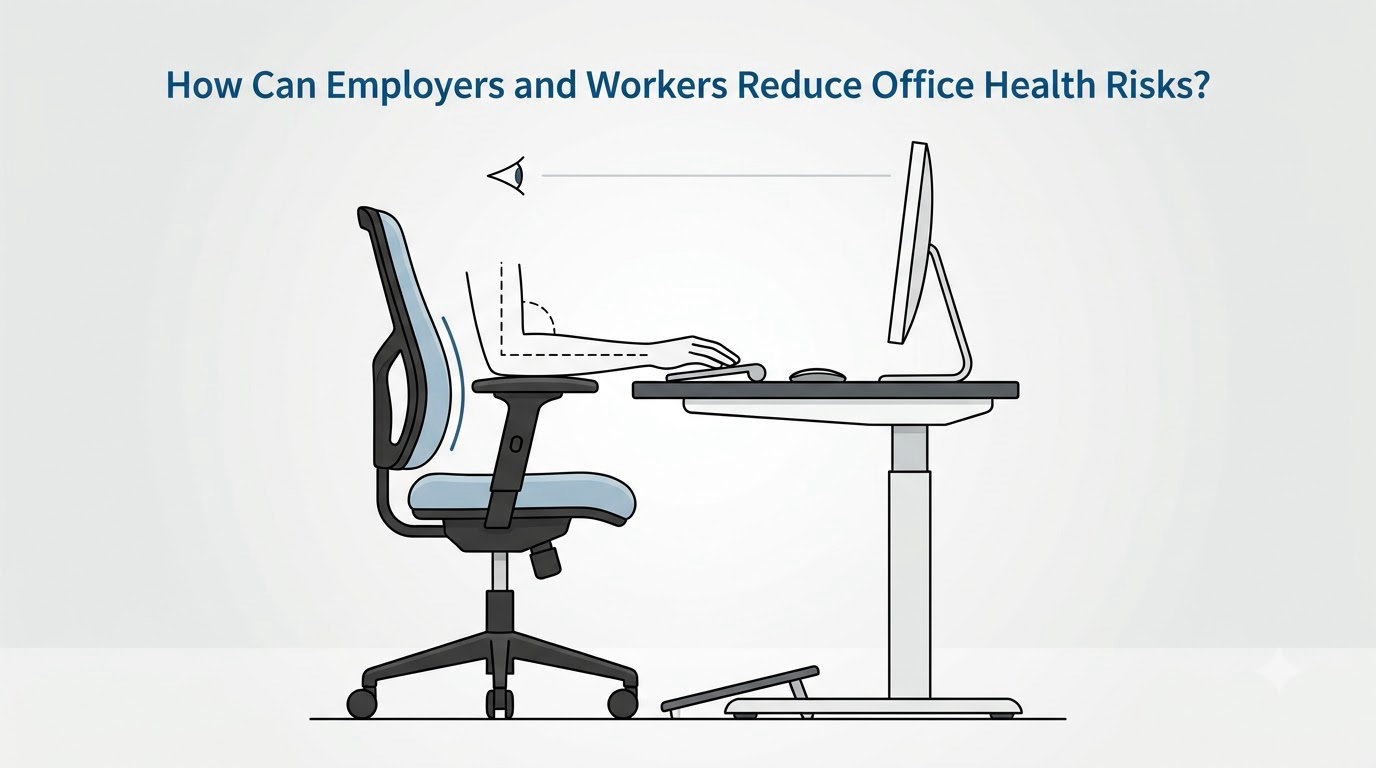
A workable prevention framework assigns each risk an owner, because ergonomics fails when nobody owns it. The eight steps below work for an office of any size, and the split between the two columns is the part most often missing.
1. Assess the hazards. Walk the floor and the desk rows: workstation fit, lighting and glare, noise, air, chemicals, walking routes, fire exits, electrical items, and psychosocial factors. Include remote workers in the assessment, not only the building.
2. Fix workstation fit. Provide adjustable seating, external monitors for laptops, correct input devices, and a way for staff to request an assessment. Record the requests, since an unresolved logged request is a much harder defence than an unlogged one.
3. Design the work, not just the space. Rotate tasks that are highly repetitive, vary posture, review meeting length and screen density, and stagger deadlines that currently collide.
4. Protect breaks. Set an expectation that lunch is lunch and that movement breaks are normal. Managers who schedule back-to-back meetings all day have removed the control before they offered it.
5. Check the environment. Confirm outdoor air supply, filtration, humidity, temperature and noise levels, and make sure cleaning and maintenance happen when the area is empty where possible.
6. Watch workload and staffing. Persistent overtime, chronic understaffing and unstable hours are health hazards that no amount of ergonomic equipment offsets.
7. Make reporting safe. Give people a route to raise a concern without going through the person it concerns, and respond in writing.
8. Review on a schedule. Ergonomic fit changes with a new chair, a new monitor, a new role, pregnancy, or an injury. Annual checks catch what a one-off assessment missed.
Individual actions run alongside these: report symptoms early, request an assessment in writing, vary your position, and take real breaks. Adjusting your own chair properly is worth ten minutes and solves a surprising share of desk discomfort, and where home working is in play, treat your kitchen table as a workstation to be measured rather than improvised.
What Evidence and Guidance Should Employers Use?
Start with the primary sources rather than a vendor blog, because the field is full of confident claims with no citation behind them. In the United States, NIOSH and the CDC cover office environment and prevention research, OSHA covers workplace safety duties, and the EPA covers indoor air. Internationally, the World Health Organization and the European Agency for Safety and Health at Work publish widely used guidance on psychosocial risk and on sedentary behaviour. Canada, the UK and Australia each have national occupational health bodies with practical assessment tools, and the American Optometric Association is the usual origin of the 20-20-20 eye rule.
Grade the claims you read. Sitting time, repetitive work, awkward posture and screen-related eye strain are well established, with consistent findings across large studies. Blue light and retinal damage at normal monitor use, and health effects of everyday electromagnetic fields in offices, are contested or unproven at typical exposure levels. A page that treats both categories with the same certainty is a page to be careful with.
Two limits worth keeping in mind. Published risk estimates describe populations, not individuals — a statistic about a group does not tell you what will happen to the person at the desk next to you. And complex hazards need a qualified professional: a certified safety professional, an occupational health nurse or physician, an ergonomist, or an industrial hygienist, depending on the question.
Frequently Asked Questions
What are the most common health risks for office workers?
Musculoskeletal problems from sitting, posture and repetitive input are consistently the most common, followed closely by digital eye strain and workplace stress or burnout. Cardiovascular and metabolic effects of long sitting, indoor air quality problems, noise and glare follow behind them. Ranking varies by job and by how the risk is measured, but the top three come up in most occupational health surveys of desk-based work.
Are standing desks healthier than sitting at a desk all day?
A sit-stand desk helps, but mostly because it lets you change position, not because standing is inherently safe. Standing still for hours loads the legs and lower back instead of the hips. The best evidence supports alternating between sitting and standing every half hour or so while working, and that sits alongside movement breaks, since neither substitutes for actually getting up and walking.
Can poor office ventilation make workers sick?
Yes. In a building with inadequate outdoor air supply, carbon dioxide builds up along with humidity, dust and chemical residues from cleaning products, adhesives and office equipment. Common complaints are stuffiness, dry or irritated eyes and throat, headaches and a heavy afternoon concentration slump. A simple carbon dioxide monitor gives you a number rather than an argument, and opening doors and windows or improving filtration usually helps quickly.
How often should office workers take breaks from sitting?
Frequent short breaks beat one long break. Most ergonomic guidance suggests changing position or moving for a couple of minutes every 30 to 60 minutes, and rising for a few minutes every hour. The break does not need to be exercise. What matters is interrupting long uninterrupted sitting, and building those moments into calls, meetings and screen time rather than waiting for a free hour that never arrives.
Should workplace stress and burnout be treated as a safety issue?
Yes. Most occupational health frameworks treat psychosocial hazards, including chronic high demand with low control, alongside chemical and physical hazards rather than as a separate softer category. The reason is practical: sustained stress without recovery is linked to sleep disruption, anxiety, depressive symptoms and increased cardiovascular risk, and those effects show up as absence, turnover and long-term claims. Treating it as a safety issue is what moves the fix out of the individual and into the job design.
Conclusion: Start With the Biggest Workplace Risk
Office worker health risks explained, put in one view: musculoskeletal strain from posture and repetition, eye strain from screen and glare, psychological strain from workload and low control, cardiovascular and metabolic strain from sitting, and environmental strain from air, noise and light. They share a fix pattern — reduce duration, reduce intensity, or change the setup.
So start where the exposure is worst, not where the symptom is most annoying. Identify the hazard causing the most exposure or the most concern, document it in writing, then address it through workstation changes, safer task and meeting design, ventilation and lighting checks, workload adjustments, and professional support where the risk is complex. Reviewed for 2026, this guide is general workplace health information, not medical advice — individual symptoms belong with a healthcare professional.