
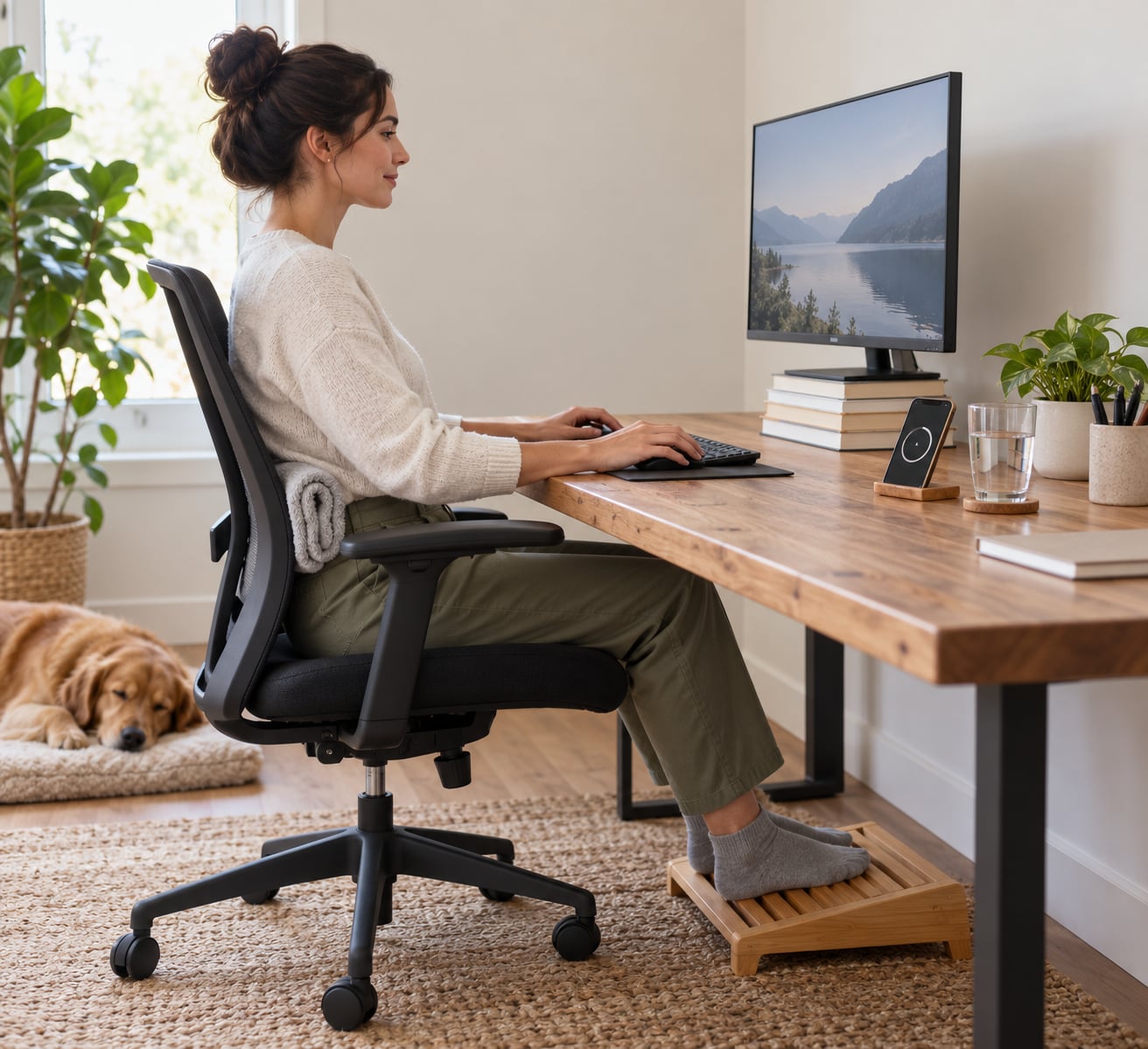
To fix posture from sitting at a desk all day, set up your chair, screen and keyboard so your joints sit close to neutral, change position every 30 to 60 minutes, and do a short strengthening routine daily. Most desk workers notice their neck and lower back feel easier within two to three weeks.
That is general guidance rather than a treatment plan, and it matters because posture changes slowly. A single afternoon of tidying your desk will not undo years of sitting, and a perfect posture held for eight hours is not the goal either. The habit that actually works is the next posture, not the ideal one.
Here is the setup, the movement pattern and the exercises I would start with, in that order.
Table of Contents
What You Need
You do not need a chair with twelve adjustment levers. You need a setup that lets your body hold a relaxed position without effort, plus two or three small habits you can keep on a normal working day.
- An adjustable chair with real lumbar support. If the backrest does not move, rest a folded towel or a small cushion at the curve of your lower back. Height adjustment matters more than the brand name.
- A screen you can raise. A monitor arm, a stack of books, or a laptop stand all put the top of the screen near eye level.
- A keyboard and mouse you can place independently of the screen. An external keyboard is what makes a raised laptop workable.
- Foot support. A footrest, a box, or a spare book keeps your feet flat when the desk is taller than your knees.
- A timer or calendar alert. A phone alarm or a repeating calendar entry every 45 minutes is more reliable than memory.
- A wall and a chair with no arms. Both show up in the exercise routine below.
Wear whatever you normally wear to work. If you are in a rigid belt or a heavily structured shoe at a standing desk, take it off for the standing part of the day.
Before you start, take a photo of yourself from the side while working, sitting the way you usually sit. That one photo is your baseline, and comparing against it after a few weeks is more useful than any mirror at the office.
Step-by-Step
Step 1: Reset Your Chair and Screen
Start with the chair. Sit back into the backrest, set the seat height so your thighs are roughly parallel to the floor and your feet are flat, and adjust the lumbar support so it fills the natural curve of your lower back. Your weight should be on your sit bones, not on the fronts of your thighs.
The most useful shortcut here is the 90-90-90 rule: hips bent about 90 degrees, knees bent about 90 degrees, and ankles bent about 90 degrees. If your shins end up at an angle because the desk is too tall, drop the chair or add a footrest until the angles line up.
Then set the screen. The top of the display should sit at or just below eye level, roughly an arm’s length away, with the panel tilted back ten degrees or so. A screen that is too low is what produces tech neck, and a screen that is too far away is what makes you lean in and creep your head forward.
Put the keyboard and mouse close enough that your elbows stay near your sides at roughly 90 to 100 degrees and your wrists stay flat rather than bent upward. A mouse that is a full forearm’s reach away is the single most common reason people round their shoulders while typing.
Two checks tell you the setup is working. First, your shoulders should be able to hang loose when you stop typing for a second. Second, you should be able to look at the screen with your chin level, not tipped down. If either fails, adjust the chair or the screen rather than your body.
Our guide to how to set up your desk to prevent back pain goes deeper on each of these measurements, including how to adapt a fixed desk you cannot move.
Step 2: Change Position Every 30 to 60 Minutes
Position changes matter more than the position you choose. Muscles that hold one shape for hours get tired, and tired muscles stop supporting the neck and shoulders. Standing up for two minutes does more than any amount of effort to sit straighter.
Use two break sizes. A microbreak is 30 to 60 seconds, taken every half hour: stand, roll your shoulders, take four slow breaths. A rest break is three to five minutes, taken at least once an hour: walk to another room, take a flight of stairs, refill a water glass.
The movement matters more than the reminder. People who set a phone alert to remind them to sit up straight usually slump again within minutes, because sitting up straight is not the point. People who set the same alert to stand and walk somewhere usually keep the habit, because the instruction is easy to follow.
If a 45-minute block is your maximum uninterrupted stretch of focus time, work with it. Schedule the alert to land in the middle of it rather than fighting the block. Our office ergonomics checklist for desk workers has a printable version of this break schedule you can run through once a month.
Step 3: Strengthen Your Posture Support Muscles
Setup and movement stop new problems. Exercises are what rebuild the muscles that hold you up, because the deep neck flexors, the mid and lower traps, and the glutes all get less work when you sit all day. Keep it bodyweight, keep it short, and keep it pain-free.
- Chin tucks, 3 sets of 10, hold 5 seconds. Sit tall, draw your chin straight back to make a double chin, hold, then release. This is the most commonly recommended move for forward head posture and the most skipped one.
- Scapular retractions, 3 sets of 10. With arms hanging or hands on your knees, pull your shoulder blades back and down as if pinching a pencil between them. Pause, then release.
- Wall angels, 2 sets of 8 to 10. Stand with your back to a wall, arms in a goalpost shape, and slide them up and down while keeping your lower back in contact with the wall. Move only as far as you can without arching.
- Thoracic extension over a chair, 2 sets of 10. Sit back from the chair edge, lace your hands behind your head, and arch gently backward over the chair back. Extend only through the upper and mid back, not the lower back.
- Doorway or doorframe chest stretch, 30 seconds each side. Forearms on the frame, step forward gently, and let the front of the shoulders open. Desk work tightens the chest, and rounded shoulders cannot be fixed while the chest stays tight.
- Standing hip flexor and glute work, 2 sets of 10 each side. A short split-stance stretch for the front of the hip, then a standing glute squeeze or bridge. Tight hips pull the pelvis forward, which pushes the lower back into a slump.
Five of those six take under eight minutes. If any of them makes symptoms worse rather than better, stop and drop that exercise, and bring it to a doctor or a physical therapist. Sharp pain, tingling or numbness is not something to work through.
For the hip side of this routine, our piece on desk exercises for stiff hips has variations for people who spend long stretches seated.
Step 4: Build a Repeatable Daily Habit
Now make it survive a busy week. Three fixed moments are enough: a setup check when you sit down, movement alerts through the day, and a short reset at the end of the day.
The morning check takes two minutes. Feet flat, back into the lumbar support, screen at eye level, mouse close. Do it before you start rather than after the first hour of neck ache.
For the reset at day’s end, take two minutes to lie face down, or stand with your forearms on a wall, and take slow breaths into your abdomen. Slumped sitting compresses the front of the body and restricts the diaphragm, and a couple of deep low breaths at the end of the day are the fastest way to undo the feeling of being folded forward.
Ramp up gradually. Week one, do the movement alerts and the setup check only. Week two, add chin tucks and scapular retractions. Weeks three and four, add wall angels, thoracic extensions and hip work. Doubling everything in the first week is the fastest way to quit in the second.
Realistic expectations help here. Stiffness usually eases within days. Measurable strength changes in your neck and upper back show up over several weeks of near-daily work. Changing a posture you have held for a decade takes months, and it takes consistency, not intensity.
Common Mistakes
Most people trying to fix desk posture are making one of these, usually more than one.
Sitting rigidly upright. Chest pushed out, spine locked, shoulders held high feels disciplined and is exhausting within an hour. Correction: sit comfortably first, then let the spine find its natural curves. You should be able to shift and slouch a little between breaks.
Monitor too low. This is the usual cause of forward head posture and the headaches that come with it. Correction: raise the top of the screen to eye level. Books under a laptop or a monitor arm both work; a stack of paper under a desktop display is enough.
Chin poking forward or tucking it too hard. Both are attempts to fight the same problem. Correction: neutral means your ear sits roughly over your shoulder, with your eyes looking straight ahead. A chin tuck held five seconds at a time works better than holding the correction all day.
Crossing one leg over the other for hours. It shortens one side of the hip and rotates the pelvis, so the next hour of sitting feels worse. Correction: keep both feet on the floor, and if you need to cross your legs, switch sides every 20 minutes.
Working on a laptop balanced on a desk or lap. Raise the screen and the keyboard moves too high, so you either crane your neck or round your back. Correction: a stand plus an external keyboard and mouse is the fix, and without one, alternate between laptop and desktop rather than doing a full day on the laptop.
A chair with no back support, or a backrest set too far away. You end up holding yourself up with your own spine. Correction: use a cushion or folded towel, and get the backrest close enough to feel it behind you.
Four signs you are sitting badly: a forward head with the ear ahead of the shoulder, rounded shoulders, lower back pain that builds through the afternoon, and wrists that ache at the end of the day. If three of those describe you, start with Step 1 this week.
One more habit worth naming. Slouching, hunching and a stiff neck are not only a spine problem. Sitting folded forward compresses your abdomen, slows digestion and can leave you feeling bloated by mid-afternoon, which is one reason posture shows up beyond how you look.
The neutral-position tip that ties it together: your best posture is your next posture. Aim for relaxed and varied rather than straight and fixed, and check in with your body a few times an hour instead of trying to police it continuously.
Frequently Asked Questions
How long does it take to fix posture from sitting at a desk?
Most people feel noticeably less stiffness in the neck and lower back within one to two weeks of changing position every 30 to 60 minutes and doing short daily exercises. Visible posture change is slower: expect several weeks of consistent work for strength gains, and several months if a slouched position has been your default for years. Timeline depends on how long you have held the old habit and how often you do the routine.
Do posture exercises actually work?
Yes, mainly by strengthening the muscles that hold you up and by giving you better awareness of where your head and shoulders sit. Chin tucks, wall angels, thoracic extensions and scapular retractions are the exercises most often recommended by physical therapists for desk workers. They build capacity over weeks, not minutes, and they work far better alongside frequent position changes than on their own.
How often should I get up during desk work?
Aim for a short microbreak every 30 to 60 minutes and a real movement break of three to five minutes at least once an hour. The length matters less than the fact that you change position: standing, walking and taking stairs all help, and looking at a phone while staying seated does not. Set a repeating alert, and pair the alert with a specific movement so you have to stand to complete it.
Do I need a standing desk to fix my posture?
No. A sit-stand desk helps, but only if you actually alternate between sitting and standing; standing still for four hours causes its own foot, calf and lower back problems. Most desk workers do well with a fixed desk that is set up well, a chair with lumbar support, and regular movement breaks. If you do get one, raise it partway through the day and change positions at least hourly.
When should desk pain or numbness mean seeing a professional?
See a doctor or a physical therapist if pain persists for more than a few weeks despite setup changes and exercises, or sooner if you have numbness, tingling or weakness in your hands or arms. Shooting pain down the arm, loss of grip strength, headaches that come with neck pain, and any pain that wakes you at night all deserve a medical appointment rather than a desk adjustment.
Start tomorrow with the chair and the screen, since that costs nothing and changes how the whole day feels. Then set one 45-minute reminder and give it a movement to do. Add the strengthening routine in a couple of weeks, once the setup is already working for you.