
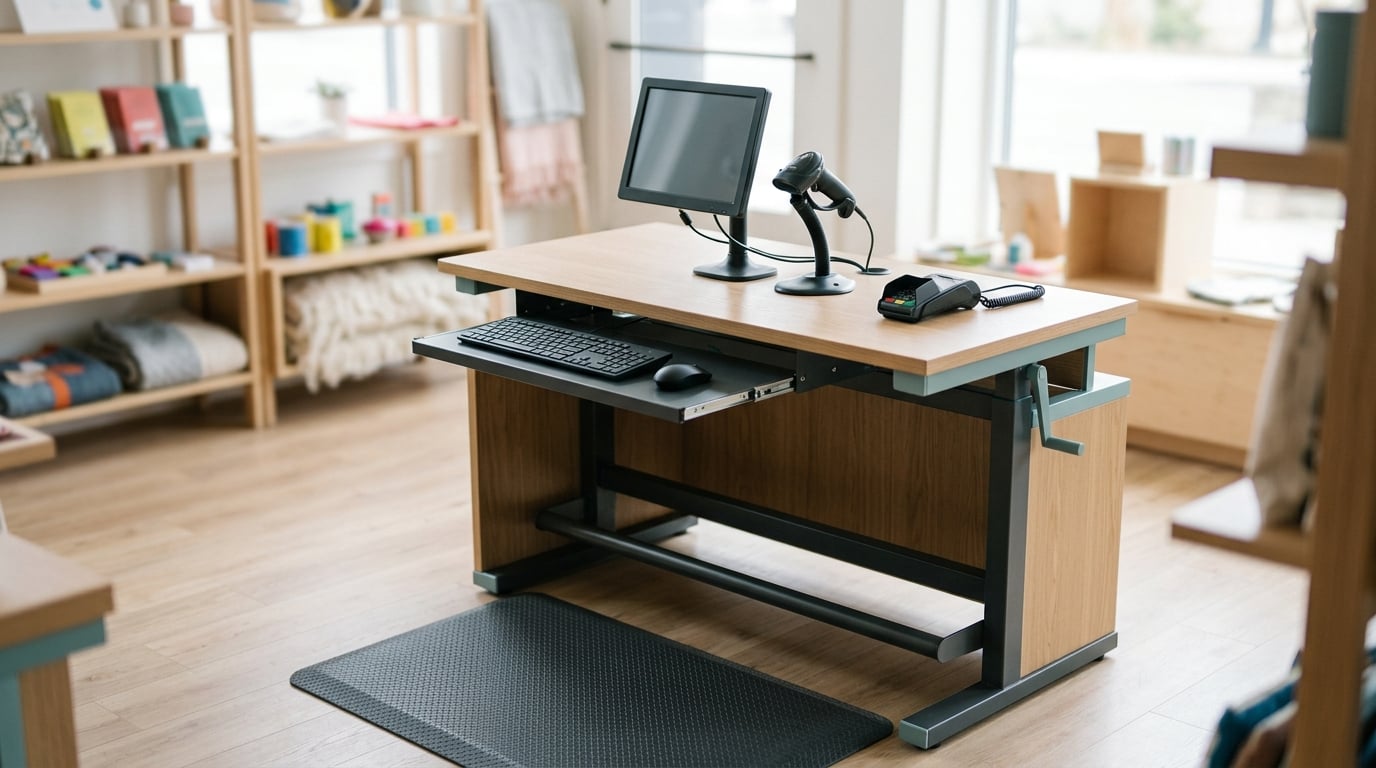
Ergonomics for cashiers and standing jobs comes down to three things: a work surface at the right height, a way to change position during the shift, and support under the feet. Hours of standing still on a hard floor load the same muscles continuously, and the discomfort that follows is a leading cause of mistakes and missed shifts in retail. This guide covers what you can change yourself and what your employer is responsible for.
Two audiences read this page. If you are the one on their feet all day, the workstation and fatigue sections are yours. If you manage a team or run safety programs, the section on employer programs is the part that matters.
Table of Contents
- What Ergonomic Risks Do Cashiers and Standing Workers Face?
- How to Set Up a Cashier Workstation: Ergonomics for Cashiers and Standing Jobs
- How to Reduce Fatigue During Standing Jobs
- Ergonomics for Cashiers: Repetitive Tasks and Work Organization
- What Should Employers Include in an Ergonomic Program?
- When Should Workers Ask for Help?
- Frequently Asked Questions
- Conclusion
What Ergonomic Risks Do Cashiers and Standing Workers Face?
Standing is not rest. When you stand still, your calves, hips, and lower back hold your body upright at a low but constant load. Muscles that never get a full rest period tire before the end of a shift, and that is where most of the discomfort comes from.
At the same time, blood that has pooled in your feet and ankles relies on the calf muscle pump to move back up toward the heart. Standing without walking means that pump idles. Over a full shift this is the mechanism behind heavy legs, ankle swelling, and the varicose veins and chronic venous insufficiency that some long-standing workers develop over years.
The main risk categories reported for standing work:
- Lower back strain from holding a static posture, and often from reaching and twisting rather than from standing itself.
- Foot and ankle problems, including plantar fasciitis, metatarsalgia, and Achilles tendinitis after a hard-floor shift.
- Knee osteoarthritis in workers with many years of standing on hard surfaces.
- Repetitive upper-limb problems from scanning, keying, and reaching across the counter thousands of times a shift.
- One-sided pain, which usually traces back to a habit of loading one leg or twisting repeatedly to the same side.
The International Ergonomics Association frames this simply: the goal is to match the work to the worker, not to ask the worker to tough it out. A recent review in a peer-reviewed supermarket study is a good example of what proper assessment looks like. Redesigning the cashier workstation there cut upper-limb risk scores measured with RULA (Rapid Upper Limb Assessment) by 66.66 percent, compared with the unredesigned station.
This is general workplace information, not medical advice. Anything about your own body deserves a conversation with an occupational health professional or your doctor.
How to Set Up a Cashier Workstation: Ergonomics for Cashiers and Standing Jobs
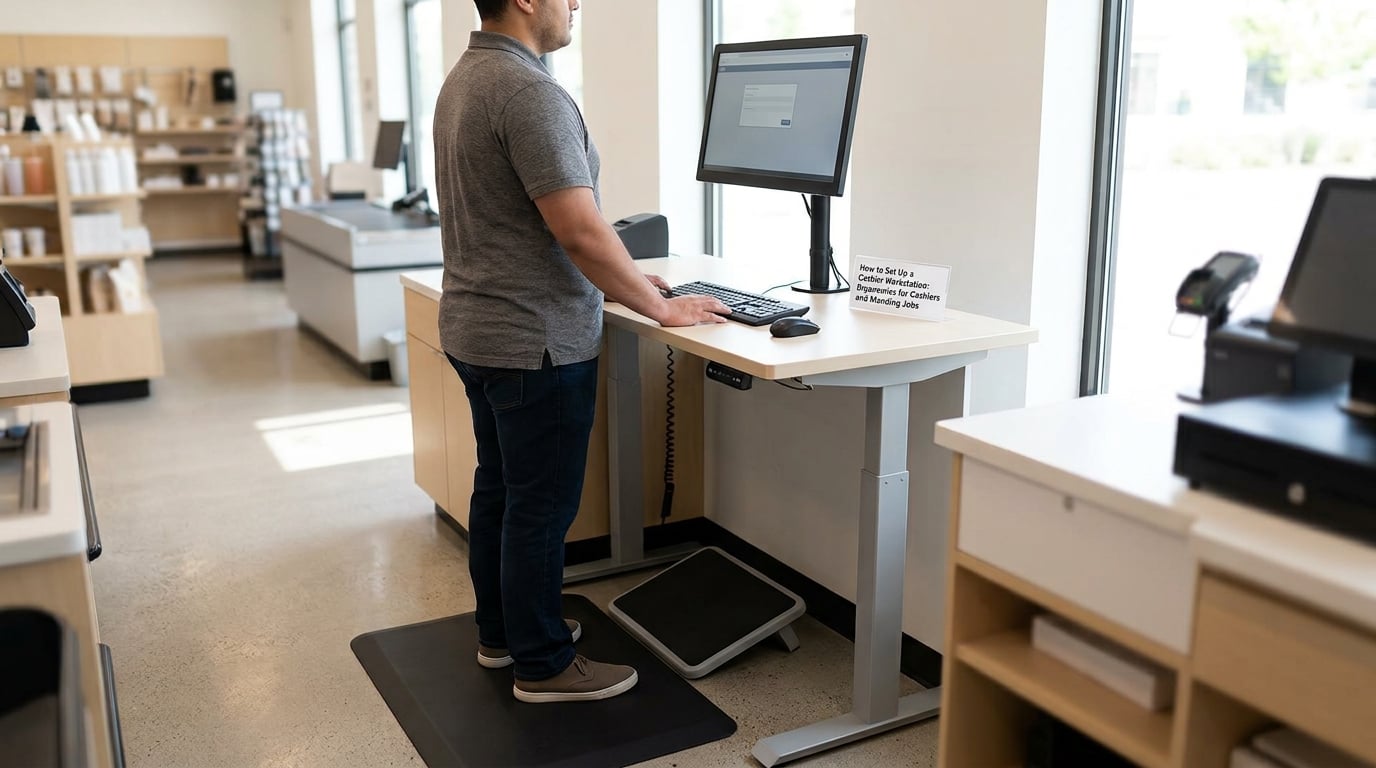
Most checkout problems come from three measurements that nobody took: counter height, reach distance, and where the feet land. Fix those and the shift feels very different.
Counter height: the number most stations get wrong
The work surface should sit roughly at your natural waist, which for most adults falls between 34 and 42 inches off the floor. Below that range you round your shoulders and curve your back over the belt. Above it, you hold your arms up all shift, which shows up later as shoulder and neck pain.
A folding table riser or an adjustable-height lane is the cheapest fix when the counter is wrong. If neither is possible, raise the transaction surface rather than the whole counter so customers can still reach it comfortably.
Reach zones and the scanner
Anything you touch more than once a minute belongs inside your forearm’s reach. That usually means the scanner, the card reader, the receipt printer, and the bagging scale sit within about 15 inches of your body. Reaching up to a high shelf or twisting to the register arm repeatedly is where one-sided lower back pain usually starts.
Angle the monitor so it faces you squarely. If the register display is off to the side, your head turns several hundred times an hour and the neck takes the load your lower back would rather have.
Foot space and floor comfort
You need enough clear floor space to shift your weight and to set one foot on a footrest without hitting anything. A footrail mounted low on the cabinet lets you change leg position without leaving your station, which is the cheapest ergonomic control available to a cashier.
The floor matters more than most managers expect. Concrete and tile transmit every step straight into your joints and lower back. An anti-fatigue mat is not a comfort luxury; it changes the surface you load all day.
How to Reduce Fatigue During Standing Jobs

Your body tolerates change better than it tolerates stillness. The single most effective intervention for standing discomfort is not a product at all. It is moving, and changing position on a schedule you do not have to think about.
Alternate instead of choosing one position
Standing all day and sitting all day are both worse than alternating between them. A 2018 review by Agarwal and colleagues looked at sit-stand workstations and low back discomfort and found benefits when workers were able to vary position rather than commit to one. The practical version: sit for a set period, stand for a set period, repeat.
A sit-stand chair, a perch stool, or even a tall stool kept behind the lane gives you somewhere to put your weight for a few minutes without leaving the register. If your employer will not provide one, some workers keep a folding perch seat in their locker.
Watch your posture while you stand
Weight belongs evenly on both feet, roughly hip-width apart, with knees unlocked. Weight-shifting onto one leg feels like relief in the moment and then loads one hip and one side of the lower back for the rest of the shift. That habit is the most common answer to one-sided back pain after a cashier shift.
Keep shoulders down and relaxed, chin level, and the spine in a neutral position rather than arched or slouched. Change something every few minutes, even if it is only moving your feet.
Footwear and the floor
Supportive, well-fitting shoes with cushioning and arch support spread load across the foot rather than concentrating it in the heel and ball. Shoes with a worn-down midsole stop doing that job, so a rotation of two pairs often helps more than a single expensive pair.
Inserts and compression stockings are also used by standing workers. Evidence for compression garments in occupational settings is mixed, so treat them as one option among several and stop if they make your feet worse. If you already have diagnosed vein problems, ask your clinician before adding them.
Breaks, hydration, and gradual change
Short movement breaks work better than one long break at the end. Even two or three minutes of walking per hour gives the calf pump something to do. Keep water within reach and drink through the shift; a lot of shift-end foot soreness is simply dehydration showing up late.
If you are new to a standing role, ramp up. A first week of six-hour shifts is a different demand on your feet than a full week of eight-hour shifts, and building to it is not a concession.
Ergonomics for Cashiers: Repetitive Tasks and Work Organization
Cashier ergonomics is only half about standing. The scanning, bagging, counting, and customer contact in a shift are what wear out the hands, wrists, and shoulders.
Two controls do most of the work here. Job rotation splits scanning-heavy minutes with tasks that use different muscle groups, so no single group carries the whole shift. Work-rest planning builds the variation into the schedule rather than leaving it to whoever happens to be free.
Then look at the physical layout. A bagging area that is too low or too far away forces a bend and a twist on every third customer. A scale you have to reach across a counter to read is a neck rotation per customer. A printer that spits tickets behind your shoulder is a shoulder rotation per transaction. Each of these is a small design flaw repeated hundreds of times a day, and each is cheap to fix once somebody points it out.
Variety inside the role also matters. If you are the only person on the lane, you cannot rotate tasks, and the accumulation of scanning, lifting, and customer pressure lands entirely on you. Scheduling is a legitimate ergonomic control here, not just an operational detail.
If pain shows up at a predictable point in the shift, that pattern is useful information. It usually maps to a specific task rather than to standing in general, which is exactly the kind of detail an employer assessment should be built on.
What Should Employers Include in an Ergonomic Program?
A program that is just a poster about posture has never reduced an injury. Programs that work follow a recognizable order, and OSHA and NIOSH both treat hazard assessment and worker participation as the foundation rather than an afterthought.
- Hazard assessment of each workstation. Measure counter heights, reach distances, and floor surfaces, and observe a real shift rather than an empty station.
- Worker participation. The person doing the job knows where it hurts and when. Include them from the start or the fixes will be wrong.
- Equipment trials before purchase. Try a stool, mat, or riser on one lane and compare feedback and error rates before rolling it out.
- Training that survives turnover. Short, repeated sessions on posture, foot support, and break cadence, written down where staff can find them.
- A simple reporting route. Workers need a way to flag discomfort early that does not require them to win an argument first.
- Review after changes and after reports. If a fix did not work, the program should say so and change it.
- Scheduled follow-up. Ergonomic problems creep back in as new equipment, new products, and new customers change the work.
Documented interventions for standing work are not exotic. NIOSH guidance for retail workers lists floor mats, shoe inserts, adjustable seating, sit-stand workstations, and compression stockings among the controls employers have used, alongside changes to the workstation itself.
Where an employer will not adjust anything, that is worth saying plainly rather than pretending a shoe change will cover it. Document your symptoms with dates, keep a record of the requests you made, and take persistent pain to a clinician rather than waiting for the workstation to change.
When Should Workers Ask for Help?
Most standing discomfort settles with a better setup and a few days of varied movement. Some of it does not, and there is a line between the two worth knowing about.
Book an appointment with a doctor or an occupational health professional if pain persists beyond a week or two despite changes, keeps returning at the same point in every shift, wakes you at night, or is steadily worsening. Pain that follows a specific task every single time is a strong signal that something in the workstation needs assessment rather than another break.
Seek medical care promptly for a swollen, red, or hot leg, a leg that feels heavy or painful to the touch, numbness or tingling that does not settle, or weakness in a foot or ankle. Loss of bladder or bowel control, or numbness around the saddle area, needs emergency care rather than a scheduled appointment.
Dizziness, lightheadedness, or feeling faint at a till is not an ergonomics problem and should be assessed promptly. Standing all day affects circulation, and a person who feels faint should sit down immediately and get medical advice rather than pushing through a shift.
Difficulty holding a safe posture for a full shift despite equipment changes is itself a reason to ask. If the workstation cannot be adjusted to fit you, that is a workplace problem, and a clinician can often write documentation that makes the conversation easier.
Frequently Asked Questions
How long is too long to stand at work?
No single hour limit applies to everyone, and much depends on the floor, footwear, and whether you can change position. As a working rule, discomfort that appears in the first hour or two of a shift is a signal to change something, not to push through it. Workers who cannot sit or move at all during a shift accumulate static load far faster than workers who can alternate positions a few times an hour.
Why do my feet hurt after a long shift on my feet?
The usual causes are a hard floor with no mat, footwear with a worn-down or thin midsole, and standing completely still for hours. Stillness stops the calf muscle pump from returning blood from the feet, so they swell and ache by the end of the shift. Starting with a mat and better shoes, then adding short walking breaks, addresses most of it.
Do anti-fatigue mats actually work?
They help, mainly by cushioning the floor and encouraging small ankle and calf movements, but they are not a cure and they do nothing for a badly set-up counter. A mat without a height or reach fix only softens the floor. If your station is the problem, adjust the station first and treat the mat as a second layer of protection.
What is the best ergonomic position for standing?
There is no single best position, because the best position is the next one. When you stand, distribute weight evenly across both feet about hip-width apart, keep your knees unlocked rather than locked, and let your shoulders and arms hang relaxed. A neutral spine beats both an exaggerated arch and a slumped posture, and position changes beat holding any single posture.
Why does one side of my lower back hurt after a cashier shift?
One-sided lower back pain after standing work usually points to repeated loading of a single side rather than to standing itself. Habitually shifting your weight onto one leg, twisting repeatedly to reach the register or a scanner, and working with a counter at the wrong height all load one hip and one side of the back. Moving the equipment closer and consciously keeping weight even is the first change to try.
How high should a checkout counter be?
Most work surfaces should sit roughly at natural waist height, which lands between about 34 and 42 inches for most adults. Too low and you round your shoulders over the belt; too high and you hold your arms up all shift. A folding riser or an adjustable lane raises the transaction surface without forcing customers to reach awkwardly.
Conclusion
Four things move the needle fastest, and none of them require a budget approval. Put the work surface at your natural waist, somewhere between 34 and 42 inches. Get the scanner, reader, and bagging area inside easy forearm reach so you stop twisting all shift. Stand on something that cushions the floor and keep your weight even with your knees unlocked. Then move on a schedule, a few minutes of walking each hour, and sit when you can.
For managers, the same list is the starting point for an assessment that includes the people doing the work. And if pain is not settling after a week or two of those changes, take it to a clinician rather than spending another month adjusting mats.